Skip to content

AI DEVELOPMENT WORKSPACE

AI Code Editor for Building Real Software

AICodeIDE brings AI-assisted coding into a project workspace where you can ask questions, work with code, review changes, and keep the development flow together.

  • Project-aware workflow
  • Reviewable changes
  • Built for developers
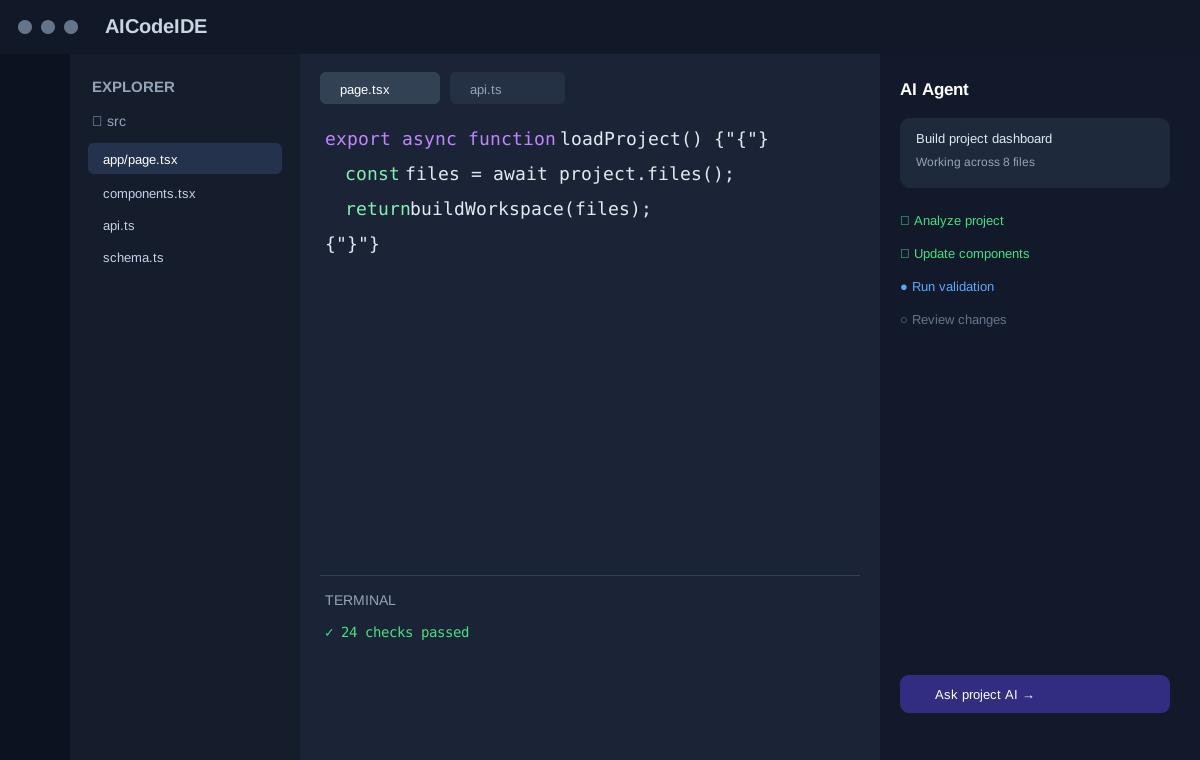
Illustrative AICodeIDE AI code editor workspace showing a project tree, code editor, terminal, and AI agent panel.
Illustrative AICodeIDE product preview.

WHY AN AI CODE EDITOR

Why an AI code editor is more than a snippet box

Instead of treating every prompt as an isolated snippet, an AI coding workflow can use the surrounding project context to make more useful suggestions. AICodeIDE is designed around that project-first experience: files stay visible, changes stay reviewable, and the editor remains the source of truth.

A code editor that understands the project

Instead of treating every prompt as an isolated snippet, an AI coding workflow can use the surrounding project context to make more useful suggestions. AICodeIDE is designed around that project-first experience: the request is interpreted alongside relevant files, naming, and existing structure—not as a blank-page code sample.

Project contextFile-aware workChange review

File-aware work across the repository

Features, bugs, and refactors rarely live in a single buffer. File-aware work is about identifying the modules that matter, reading them with the task in mind, and proposing edits that respect neighboring code. You still choose which files stay in scope.

File-aware workMulti-file tasks

Change review stays in the editor

Generated output is not the end of the workflow. Change review keeps diffs visible so you can accept, reject, or adjust what was proposed. The editor is built so AI assistance supports development without hiding what will land in the project.

Change reviewDeveloper control

CORE CAPABILITIES

Core AI coding capabilities

More than autocomplete: code completion is useful for small edits, but larger tasks often require reasoning across files. The product experience is designed to support generation, explanation, debugging, refactoring, and agent-style tasks in one place—without treating those as disconnected tools.

Understand project context

Ask about a module, follow related files, and get explanations that refer to the code in the workspace. Context is selected for the task rather than pasted as an unbounded dump. The goal is a clearer picture of how the current project is structured before you change it.

Explain codeLocate related filesSummarize a module

Generate code

Describe the behavior you need in natural language and receive proposed implementation in the files that belong to the task. Generation is meant to fit existing patterns when those files are in context. You inspect the result in the editor instead of copying from a detached chat transcript.

Natural-language requestProposed implementation

Edit multiple files

A feature may touch a route, a component, validation, and a test. Multi-file edits keep those related changes together so you can review them as one unit of work. Scope remains explicit: you see which paths are included before anything is accepted.

Coordinated editsVisible file list

Debug issues

Bring an error, failing test, or unexpected behavior into the same workspace as the source. Debugging here means inspecting the relevant files, forming a hypothesis, and proposing a focused fix—not replacing your own judgment about production impact.

ErrorsFailing testsFocused fixes

Refactor code

Refactors need consistent naming, structure, and call sites. An AI code editor can help plan and apply structural changes while you watch the diff. The intent is safer, reviewable cleanup—not an unsupervised rewrite of the repository.

StructureNamingCall sites

Review changes

Every meaningful edit should remain inspectable. Review is the step where you read the diff, check adjacent code, and decide what lands. AI assistance proposes; you remain the approver for what the project actually contains.

Diff reviewAccept or reject

WORKFLOW

From request to reviewed change

A typical workflow can move from a natural-language request to an implementation plan, proposed file changes, review, and validation. The preview and example on this page use illustrative data to show the experience. The steps below describe that loop; they are a product workflow, not a guarantee that work is complete.

  1. 01

    Understand

    Start from the request and the files that are likely involved. The workspace keeps project structure visible so the task is grounded in existing code rather than a blank prompt.

  2. 02

    Plan

    Turn the request into a short implementation plan: which files may change, what behavior is expected, and what should stay untouched. Planning is a checkpoint before edits are proposed.

  3. 03

    Generate

    Produce the first implementation or explanation against that plan. Generation happens in the context of the selected project, so the output is meant as project work rather than a standalone snippet.

  4. 04

    Edit

    Apply the work as proposed file changes you can open, compare, and adjust. Multi-file tasks stay grouped so related edits are reviewed together.

  5. 05

    Review

    Inspect the diff. Accept what is correct, reject what is not, and keep developer control over the repository. Review is required for writes—not an optional extra.

  6. 06

    Validate

    Check the result with the tests, diagnostics, or manual verification you already use. Validation remains a visible part of the workflow so a green path is confirmed, not assumed.

ILLUSTRATIVE EXAMPLE

A realistic development workflow

The walkthrough below uses illustrative data for demonstration. It shows how a developer might move from a natural-language requirement to reviewed, validated changes in an AI code editor.

Illustrative developer request

Add rate limiting to the public signup API and return a clear error when the limit is exceeded.

  1. 01

    Start with a natural-language requirement

    The developer states the outcome in plain language: protect signup, keep existing success paths, and surface a clear client error when requests are throttled. No implementation details are required up front.

  2. 02

    Understand relevant project files

    Illustrative context might include an API route such as app/api/signup/route.ts, a shared rate-limit helper, and an existing error-mapping module. The editor is used to locate those files instead of guessing from memory.

  3. 03

    Create an implementation plan

    A short plan could be: reuse the existing limiter if one exists, apply it on the public signup path, map a 429-style response through current error helpers, and add a focused test. Adjacent auth flows stay out of scope.

  4. 04

    Propose changes

    The workspace shows proposed edits across the route, helper, and test files. This is still a proposal: paths and diffs are listed so the developer can see the blast radius before accepting anything.

  5. 05

    Review the diff

    Each hunk is inspected for behavior, naming, and accidental extra files. The developer accepts the limiter wiring, adjusts a message string, and rejects unrelated formatting in a shared module.

  6. 06

    Validate the result

    Illustrative validation: run the signup test file and confirm the throttled path returns the expected error shape. The task is complete only after that check, not when the first draft appears.

PRODUCT PREVIEW

See the workspace in one view

The preview uses the AICodeIDE workspace illustration: project tree, editor, terminal, and an AI panel together. It is a product visual with dummy UI data—not a live, clickable IDE.

Illustrative AICodeIDE AI code editor workspace showing a project tree, code editor, terminal, and AI agent panel.
Illustrative AICodeIDE product preview.

USE CASES

Use cases for an AI code editor

The same project-aware loop—understand, plan, edit, review, validate—supports everyday software work, from a new feature to a careful refactor.

Building features

Describe the behavior you want, identify the modules that should change, and keep implementation, adjacent files, and review in one workspace. Feature work stays connected to the existing project instead of a throwaway prototype.

New behaviorMulti-file implementation

Fixing bugs

Start from a failure, inspect the relevant source, and propose a focused patch. Debugging in an AI code editor still ends with your review of the diff and a check that the original symptom is addressed.

ErrorsFocused patches

Refactoring

Restructure code when the current design is hard to change. An editor-centered refactor keeps call sites and diffs visible so cleanup is deliberate rather than a silent rewrite.

StructureConsistency

Understanding an existing codebase

Ask how a flow works, which files own a behavior, and how modules relate. Explanations are most useful when they point back at the repository you are reading.

OnboardingModule summaries

Reviewing changes

Use the editor to inspect proposed edits—yours or AI-assisted—before they are accepted. Review is part of the product workflow, including diffs and the files they touch.

DiffsApproval

Writing tests

Generate or extend tests next to the code under change. Tests remain reviewable artifacts: you confirm coverage, names, and assertions rather than treating generated tests as automatically sufficient.

Test filesValidation

WHY AICODEIDE

Why AICodeIDE is built this way

AICodeIDE is an AI-first development workspace. The emphasis is a connected workflow: project context, developer control, reviewable changes, and the familiar pieces of building software in one place.

Project context first

Assistance is designed around the repository in the workspace. Prompts are more useful when they can refer to real files, not only to a detached snippet.

Developer control

You decide what is accepted. AI can propose plans and edits; it does not replace review, architecture choices, or responsibility for what ships.

Reviewable changes

Writes are meant to go through visible diffs. That keeps generated code inspectable and keeps the editor—not a hidden side channel—as the place changes land.

Connected development workflow

Questions, code, review, and validation belong in the same product surface. The goal is to keep the development flow together instead of bouncing between an editor and an unrelated chat window.

FAQ

Frequently asked questions

What is an AI code editor?

An AI code editor combines traditional source-code editing with AI features such as code generation, explanation, debugging, and project-aware assistance. The editor remains the place where you inspect files, apply changes, and keep the work visible.

Can an AI code editor work across multiple files?

Project-aware workflows can reason about relevant files and propose coordinated changes. The exact scope depends on the task, the files in context, and what you choose to review and accept.

Is AICodeIDE a replacement for a traditional editor?

AICodeIDE is designed as an AI-first development workspace, while retaining the familiar concepts developers expect from a code editor: files, diffs, and a path from suggestion to implementation.

How is an AI code editor different from generating isolated snippets?

Snippet tools often treat a prompt as a self-contained request. A project-aware editor can use surrounding files, naming, and existing patterns so generated or edited code is meant to fit the software you already have.

Do I review AI-generated changes before they are applied?

Yes. The intended workflow is to inspect proposed edits, including diffs, before accepting them. Developers remain responsible for architecture, correctness, security, and the final change.

Can I use an AI code editor on an existing codebase?

Yes. Project-aware assistance is especially useful when relevant source files are available, so the editor can explain existing modules, locate related code, and propose edits that match current conventions.

What kinds of tasks fit an AI code editor?

Typical work includes building features, fixing bugs, refactoring, understanding unfamiliar modules, reviewing proposed changes, and writing tests. Small local edits and larger multi-file tasks can both go through the same ask, plan, edit, and review loop.

Does an AI code editor only write application code?

No. The same workspace can help generate or update tests, explain failures, and support debugging. Validation still belongs to you: run checks, inspect diagnostics, and confirm behavior before you treat a task as done.

What should I check after accepting a change?

Review the diff, related files, and any tests or diagnostics you rely on. Confirm that the change matches the request, does not introduce secrets or unsafe patterns, and still fits the project's structure.
START BUILDING

Bring your next coding task into an AI-first workspace

Start with a question, an existing project, or a new idea and move toward a reviewed implementation. Keep files, diffs, and validation in one development flow.